Posts

Basic HTTP Authentication with PHP
Image
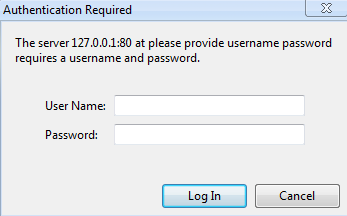
HTTP authentication protection that can be used to restrict access to a page. This causes the browser to show a pop up message box to enter username and password. Below is a sample code for HTTP authentication: <?php if(!defined('PHP_AUTH_USER')){     define('PHP_AUTH_USER','root'); } if(!defined('')){     define('PHP_AUTH_PW','toor'); } if (!isset($_SERVER['PHP_AUTH_USER'])) {     header('WWW-Authenticate: Basic realm="Restricted Area"');     header('HTTP/1.0 401 Unauthorized');     echo 'You are not authorized to access this page.';     exit; } else {     if( $_SERVER['PHP_AUTH_USER']==PHP_AUTH_USER &&          $_SERVER['PHP_AUTH_PW']==PHP_AUTH_PW){                 //do your operation here.     }else{                header('WWW-Authenticate: Basic realm="Authori...

FightTVplus is available in Roku

Image
FightTV Plus Roku Channel is available in Roku Store now. This channel offers you the best of MMA, Boxing, Wrestling videos in HD and SD quality. All you have to do is subscribe to this channel which is only at $4.99.  You can subscribe/install the channel from http://www.roku.com/channels/#!details/44370/fighttv-plus . For more ease of use, android app and iOS app are on the way to respective stores. Very soon its coming on Chromecast too. You can also signup for email updates at http://fighttvplus.com/  to get updates about the new video uploads and features added to Roku , Android and iOS apps.

Creating broadcast safe graphics with Gimp

Image
I have been writing posts about Roku Development. An important point to consider while developing the applications is to use Broadcast safe graphics. There is difference in the way TVs and a Monitor display colors. RGB values less than 16 appear too dark  and those above 235 appear blown out in TV Screen. For a Roku channel we usually need the following basic artworks: a. Channel Store HD artwork: 290px (W) x 218px (H) b. Channel Store SD artwork: 214px (W) x 144px (H) c. Home Screen Focus HD: 335px (W) x 210px (H) d. Home Screen Focus SD: 248px (W) x 140px (H) e. Home Screen Side HD: 108px (W) x 69px (H) f. Home Screen Side SD: 80px (W) x 46px (H) The images can be adjusted in Photoshop from the dropdown menu: Image->Adjustments->Levels and setting the output level to 16-235. In Gimp, you can go to Colors-> Levels to set the output level. Also if you are using lines, make sure the lines are atleast 2 pixels wide. Avoid using contract colours next to eac...

Use Trello to organize yourself

Image
Trello is a collaboration tool that can be used to manage organizations and the projects within. Trello was made by Fog Creek Software in New York.  It has been very useful for both small and bigger organizations. Registration in Trello is not only easy but also free. It has got clean interface and is very easy to use. Its also available in Android , iPhone, iPad, Windows 8 and therefore you can use it on the go wherever you are. Its very easy to learn and get started. It works as a very good todo list and also its works as a lesson planner, community bulletin. One can assign task to members, add dates, use different labels. Drag and drop makes it even easy to move the cards. The calendar app and voting app (mostly used to gather opinions )  makes it even more effective. It can be used to discuss on any topic, attach files along with in the discussion and more. It just gives you a one shot glance of all what you have to do or are discussing. Every progress can be ...

Downloading Live Stream Videos

Image
RTMPDUMP is a command line utility for RTMP streams.  Its main purpose is to connect to a RTMP server, capture the stream and save it into  a file. It supports all forms of rtmp, viz: rtmp://, rtmpt://, rtmpe://, rtmpte://, and rtmps:// . Installation of rtmpdump installs: rtmpdump, rtmpsrv, rtmpsuck and rtmpgw. But here in this post, we are going to discuss on the how to of rtmpdump. I am in my ubuntu 12.04 and to install rtmpdump, we use the following command: $ sudo apt-get install rtmpdump This should install rtmpdump. Now to capture stream we use the command as follows: $ rtmpdump -r rtmp://example.com/path/to/video -o rtmp.mp4 -r is for the stream to capture and -o is for the name of output file to which the sream will be saved. More details on the usage of rtmpdump can be found by the command: $ man rtmpdump

Getting started with Samsung Smart TV Apps

Image
To get started with Samsung Smart TV Apps, you need to install the SDK and the Emulator from : http://www.samsungdforum.com/Devtools/SdkDownload The emulator is a virtual box image file which can be imported to Virtual Box . You can download virtual box from  https://www.virtualbox.org/wiki/Downloads . Once you have downloaded the SDK and unzipped it, you should be able to open the IDE and from Preferences->Samsung Smart TV -> Emulator, you can choose the import virtual machine to be the emulator. Now from File->New->Project->Samsung Smart TV Apps you can create either Javascript App Project  Apps Framework App Project PNaCl App Projects We will go with Apps Framework App Project. We will name our project: And now we proceed without selecting any template project: A new project is created with the following directory structure: -app -htmls -Scene1.html -scenes -Scene1.js -stylesheets -Sce...

Getting started with Objective C in Linux

Image
Objective C is a general purpose, object-oriented programming language and is used by Apple for iOS and OS X operating system. Objective C source code program have a .m extension with their hearder files with extension .h. Installing GNUStep in ubunut: sudo apt-get install gnustep gnustep-devel gobjc Let's write the first objective C program which will print 'Hello World': File: hello.m #include int main(int n, char** argv) { printf("Hello World \n"); return 0; } We can compile the above program with the command : gcc -o hello hello.m And then we can run the compile program with the command ./hello If you compile simply as gcc hello.m then the compiled program would be a.out which you can run as ./a.out